Xelium OneXelium One
PlatformModulesSolutions
  • Product TourSee Xelium One screen by screen
  • Security & trustHow your data is protected
  • Founder's visionWhy we are building Xelium One
  • FAQsAnswers to common questions
  • All resourcesGuides, pricing and more
Pricing
Product TourSign inGet started
  • Platform
  • Modules
  • Solutions
  • Pricing

Resources

  • Product Tour
  • Security & trust
  • Founder's vision
  • FAQs
  • All resources
Sign inGet started

Product Tour · no sign-up needed

Xelium One Product Tour

Walk through Xelium One in 11 short steps, from one shared Core to invoices and reports. Every picture is a real Xelium One screen from the demo organisation Northwind (demo data); the people, clients and amounts are example data.

Step 9 of 11Skip to Get started
  1. Meet Xelium One (seen)
  2. One Core (seen)
  3. People (seen)
  4. Pulse (seen)
  5. Talent & offers (seen)
  6. Timesheets (seen)
  7. Revenue (seen)
  8. Invoicing (seen)
  9. 9Reports
  10. 10Administration
  11. 11Get started

Reports from the records you already keep.

Analytics & Reports
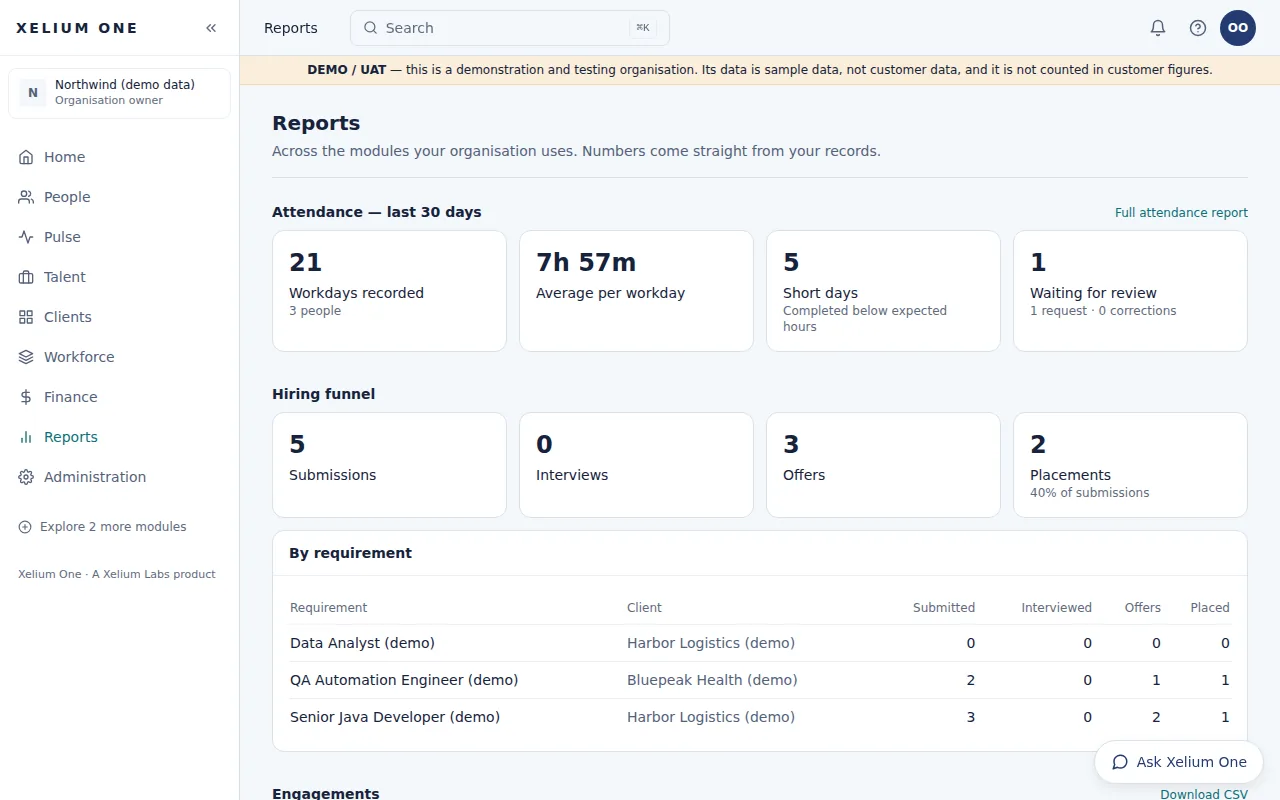
The Reports page for the demo organisation: attendance for the last 30 days, the hiring funnel, and submissions, interviews, offers and placements for each requirement.
Real Xelium One screen · demo organisation, example dataAttendance and the hiring funnel, from the records teams already keep. Open full size: Reports

Role-aware reports across the modules you use — attendance, the hiring funnel and placement engagements from client to hours to billing — with CSV download.

Xelium One's reports read the same records your teams work in, and show each person only what their role allows.

Key points

  • Attendance totals per person for up to 92 days, with CSV
  • Hiring funnel: submissions, interviews, offers and placements per requirement
  • Engagements: placement, client, hours and billing, with CSV
  • Only what your role may see
Explore Analytics & Reports

What it connects to

  • Xelium PulseAttendance reports.
  • Xelium TalentHiring funnel and placements.
  • Invoicing & ReceivablesReceivables and billing.
Previous: Invoicing & ReceivablesTip: use the ← and → keysNext: Administration
Xelium OneXelium OneA Xelium Labs product

One Business. One Platform. People. Operations. Intelligence. Connected.

Platform

  • Explore the platform
  • All modules
  • Solutions
  • Build your Xelium One
  • Pricing

Modules

  • Xelium One Core
  • Xelium Pulse
  • Xelium Talent
  • Xelium CRM
  • Timesheets
  • Revenue
  • Incentives
  • Invoicing
  • Reports
  • Xelium Vendor (coming soon)

Resources

  • Product Tour
  • Security & trust
  • Founder's vision
  • FAQs
  • All resources

Company

  • Xelium Labs
  • Careers pages
  • Talk to us
  • Sign in
  • Get started
Xelium One · A Xelium Labs product