Xelium OneXelium One
PlatformModulesSolutions
  • Product TourSee Xelium One screen by screen
  • Security & trustHow your data is protected
  • Founder's visionWhy we are building Xelium One
  • FAQsAnswers to common questions
  • All resourcesGuides, pricing and more
Pricing
Product TourSign inGet started
  • Platform
  • Modules
  • Solutions
  • Pricing

Resources

  • Product Tour
  • Security & trust
  • Founder's vision
  • FAQs
  • All resources
Sign inGet started

Product Tour · no sign-up needed

Xelium One Product Tour

Walk through Xelium One in 11 short steps, from one shared Core to invoices and reports. Every picture is a real Xelium One screen from the demo organisation Northwind (demo data); the people, clients and amounts are example data.

Step 3 of 11Skip to Get started
  1. Meet Xelium One (seen)
  2. One Core (seen)
  3. 3People
  4. 4Pulse
  5. 5Talent & offers
  6. 6Timesheets
  7. 7Revenue
  8. 8Invoicing
  9. 9Reports
  10. 10Administration
  11. 11Get started

The shared workforce foundation.

People
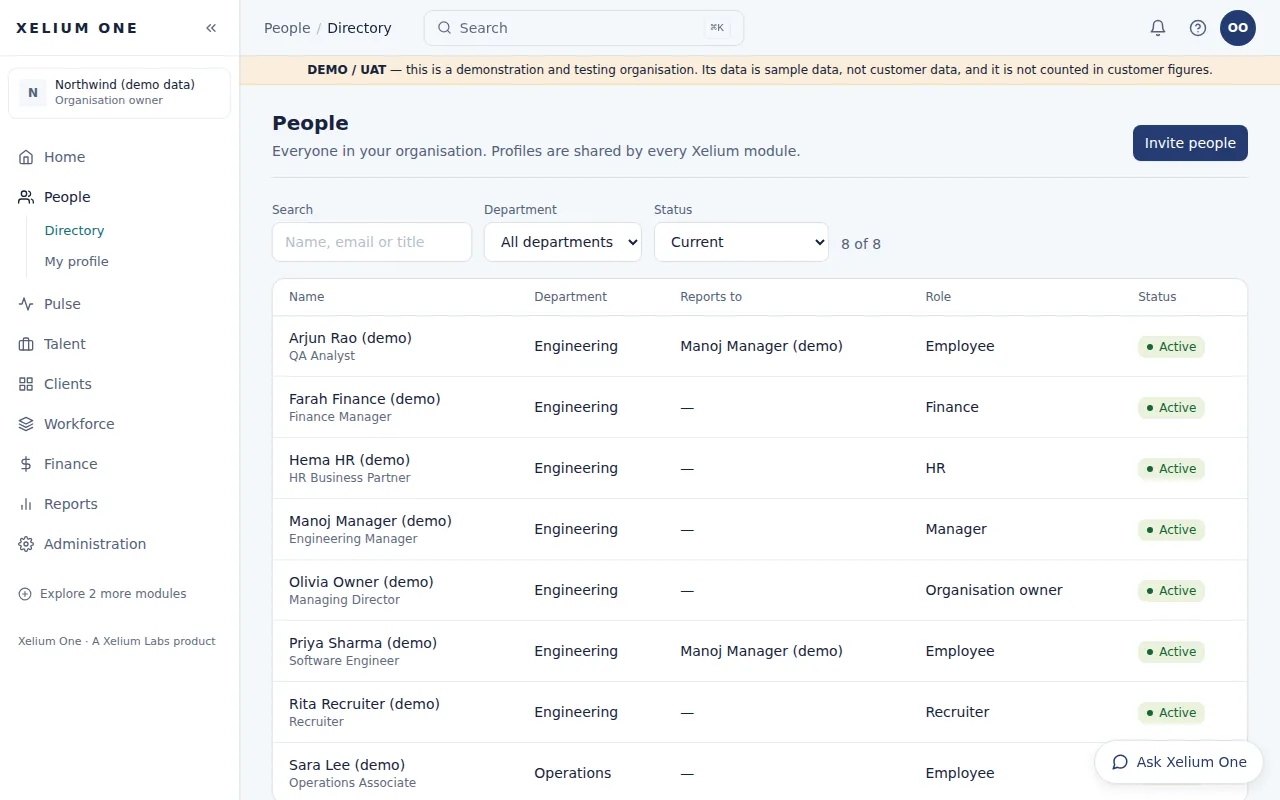
The People directory listing demo employees with their department, reporting manager, role and status, with search and filters above.
Real Xelium One screen · demo organisation, example dataOne directory of everyone in the organisation, with reporting managers and roles. Open full size: Directory

One directory of everyone in your organisation — profiles, departments, reporting managers and status — used by every Xelium One module.

People gives Xelium One a single record for each person, so managers, policies and reports all agree.

Key points

  • Employee directory with search and department filter
  • Employee profiles: designation, department, email and reporting manager
  • Current and former employees (active, notice period, exited)
  • Reporting managers, used to route approvals
Explore People

What it connects to

  • Xelium PulseAttendance and requests belong to the person and go to their reporting manager.
  • Xelium One CoreRoles and access are part of the same person record.
  • Analytics & ReportsPeople counts and attendance reports use the same directory.
Previous: One Core for every moduleTip: use the ← and → keysNext: Xelium Pulse
Xelium OneXelium OneA Xelium Labs product

One Business. One Platform. People. Operations. Intelligence. Connected.

Platform

  • Explore the platform
  • All modules
  • Solutions
  • Build your Xelium One
  • Pricing

Modules

  • Xelium One Core
  • Xelium Pulse
  • Xelium Talent
  • Xelium CRM
  • Timesheets
  • Revenue
  • Incentives
  • Invoicing
  • Reports
  • Xelium Vendor (coming soon)

Resources

  • Product Tour
  • Security & trust
  • Founder's vision
  • FAQs
  • All resources

Company

  • Xelium Labs
  • Careers pages
  • Talk to us
  • Sign in
  • Get started
Xelium One · A Xelium Labs product