Xelium OneXelium One
PlatformModulesSolutions
  • Product TourSee Xelium One screen by screen
  • Security & trustHow your data is protected
  • Founder's visionWhy we are building Xelium One
  • FAQsAnswers to common questions
  • All resourcesGuides, pricing and more
Pricing
Product TourSign inGet started
  • Platform
  • Modules
  • Solutions
  • Pricing

Resources

  • Product Tour
  • Security & trust
  • Founder's vision
  • FAQs
  • All resources
Sign inGet started

Product Tour · no sign-up needed

Xelium One Product Tour

Walk through Xelium One in 11 short steps, from one shared Core to invoices and reports. Every picture is a real Xelium One screen from the demo organisation Northwind (demo data); the people, clients and amounts are example data.

Step 5 of 11Skip to Get started
  1. Meet Xelium One (seen)
  2. One Core (seen)
  3. People (seen)
  4. Pulse (seen)
  5. 5Talent & offers
  6. 6Timesheets
  7. 7Revenue
  8. 8Invoicing
  9. 9Reports
  10. 10Administration
  11. 11Get started

From requirement to placement.

Xelium Talent
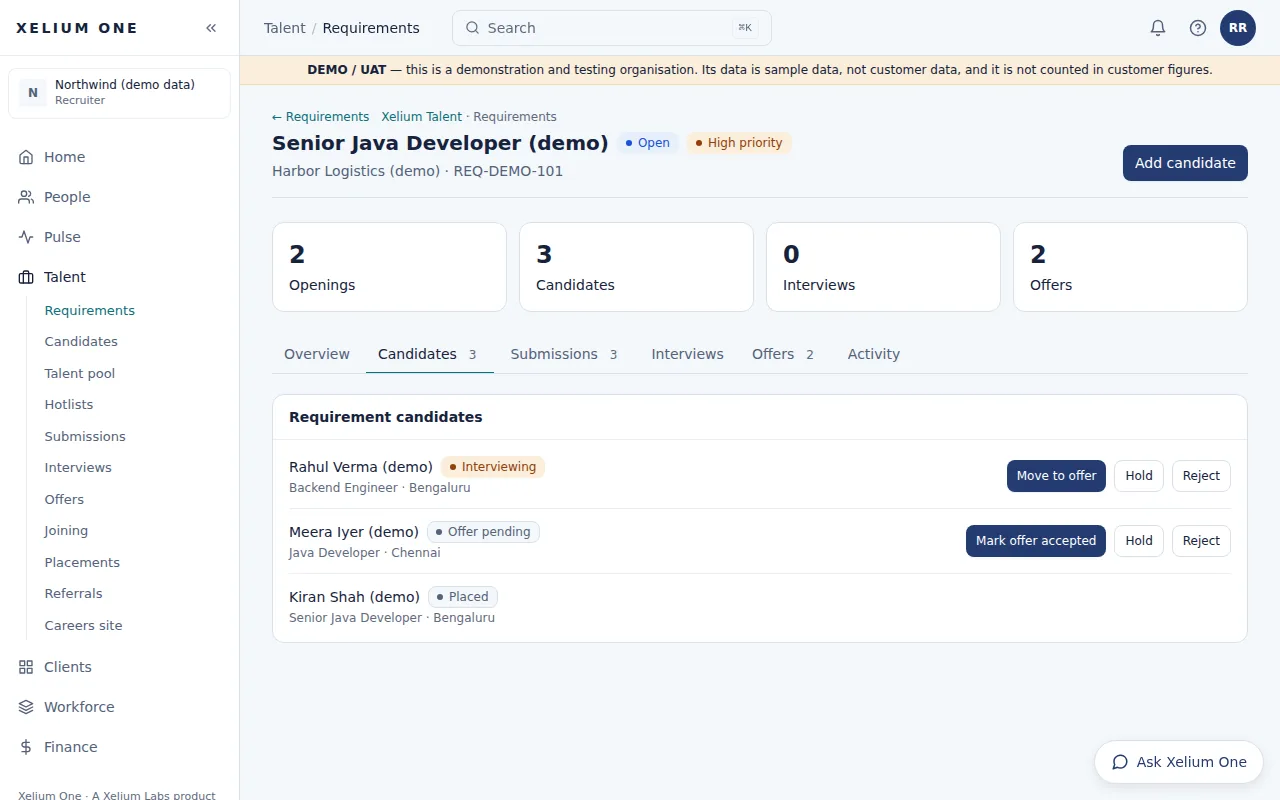
A Xelium Talent requirement, Senior Java Developer (demo), showing openings, candidates, interviews and offers, and the candidates on it at interviewing, offer pending and placed stages.
Real Xelium One screen · demo organisation, example dataA recruiter's requirement with its candidate pipeline. Open full size: Requirement

Requirements, candidates, submissions, interviews, offers with approval, joining and placements — plus a careers page and referrals.

Talent keeps the whole hiring journey in one place, from the client's requirement to the candidate's first day.

Key points

  • Requirements with client, skills, experience, openings and priority
  • Link candidates to a requirement and move them through stages
  • Offer terms: compensation, breakup, engagement type (direct hire, contract, contract to hire) and dates
  • Approval by a manager or administrator — the person who made the offer can't approve it
  • An accepted offer becomes exactly one placement
Explore Xelium Talent

What it connects to

  • Xelium CRMRequirements can be linked to client accounts.
  • TimesheetsPlacements are what timesheets are recorded against.
  • RevenuePlacement rates turn approved hours into revenue and margin.
  • Analytics & ReportsThe hiring funnel appears in Reports.
Previous: Xelium PulseTip: use the ← and → keysNext: Timesheets
Xelium OneXelium OneA Xelium Labs product

One Business. One Platform. People. Operations. Intelligence. Connected.

Platform

  • Explore the platform
  • All modules
  • Solutions
  • Build your Xelium One
  • Pricing

Modules

  • Xelium One Core
  • Xelium Pulse
  • Xelium Talent
  • Xelium CRM
  • Timesheets
  • Revenue
  • Incentives
  • Invoicing
  • Reports
  • Xelium Vendor (coming soon)

Resources

  • Product Tour
  • Security & trust
  • Founder's vision
  • FAQs
  • All resources

Company

  • Xelium Labs
  • Careers pages
  • Talk to us
  • Sign in
  • Get started
Xelium One · A Xelium Labs product