Xelium OneXelium One
PlatformModulesSolutions
  • Product TourSee Xelium One screen by screen
  • Security & trustHow your data is protected
  • Founder's visionWhy we are building Xelium One
  • FAQsAnswers to common questions
  • All resourcesGuides, pricing and more
Pricing
Product TourSign inGet started
  • Platform
  • Modules
  • Solutions
  • Pricing

Resources

  • Product Tour
  • Security & trust
  • Founder's vision
  • FAQs
  • All resources
Sign inGet started

Product Tour · no sign-up needed

Xelium One Product Tour

Walk through Xelium One in 11 short steps, from one shared Core to invoices and reports. Every picture is a real Xelium One screen from the demo organisation Northwind (demo data); the people, clients and amounts are example data.

Step 6 of 11Skip to Get started
  1. Meet Xelium One (seen)
  2. One Core (seen)
  3. People (seen)
  4. Pulse (seen)
  5. Talent & offers (seen)
  6. 6Timesheets
  7. 7Revenue
  8. 8Invoicing
  9. 9Reports
  10. 10Administration
  11. 11Get started

Approved hours you can bill.

Timesheets
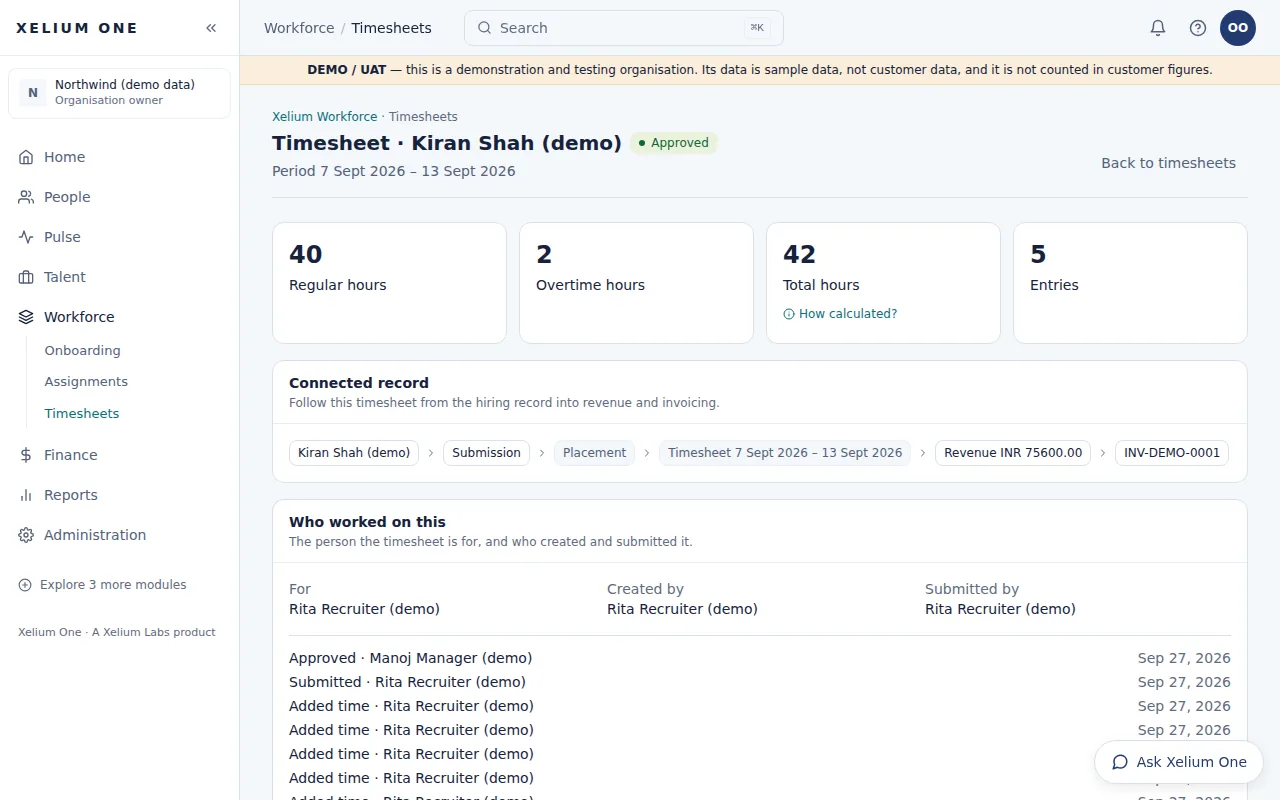
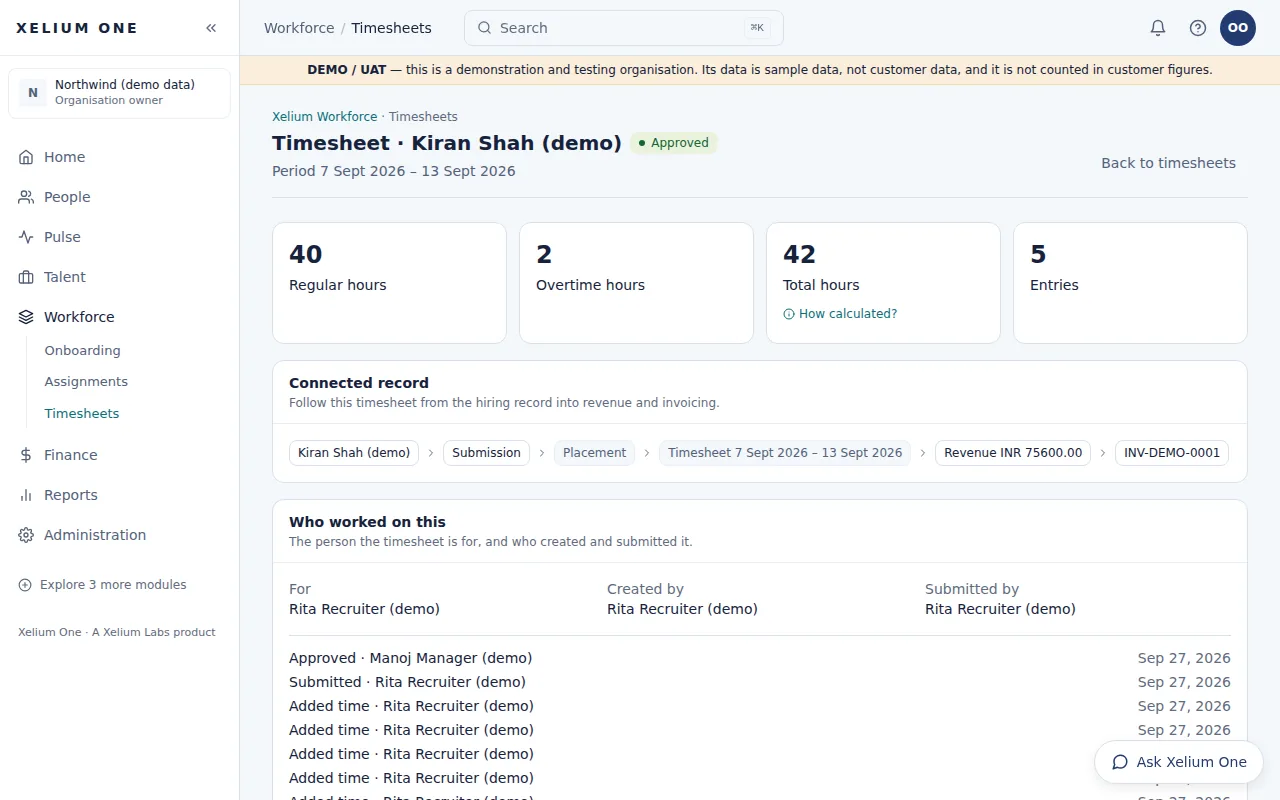
An approved weekly timesheet for a demo placement: regular, overtime and total hours, the connected record from placement to revenue and invoice, and who created, submitted and approved it.
Real Xelium One screen · demo organisation, example dataAn approved timesheet, linked to the placement, revenue and invoice. Open full size: Timesheet

Time recorded against a placement for a period, submitted and approved — the approved hours that revenue and invoices are built from. Part of Xelium Workforce, with onboarding and assignments.

Timesheets keeps hours with the placement they belong to and makes approval the single step that turns them into revenue.

Key points

  • A timesheet per placement and period
  • Regular and overtime hours per day, with notes
  • Approve or reject with a comment; the person who submitted can't approve
  • Approved timesheets can't be edited
Explore Timesheets

What it connects to

  • Xelium TalentTimesheets are recorded against Talent placements.
  • RevenueApproved hours × placement rates = revenue and margin.
  • Invoicing & ReceivablesRevenue from approved timesheets is invoiced to the client.
Previous: Xelium TalentTip: use the ← and → keysNext: Revenue
Xelium OneXelium OneA Xelium Labs product

One Business. One Platform. People. Operations. Intelligence. Connected.

Platform

  • Explore the platform
  • All modules
  • Solutions
  • Build your Xelium One
  • Pricing

Modules

  • Xelium One Core
  • Xelium Pulse
  • Xelium Talent
  • Xelium CRM
  • Timesheets
  • Revenue
  • Incentives
  • Invoicing
  • Reports
  • Xelium Vendor (coming soon)

Resources

  • Product Tour
  • Security & trust
  • Founder's vision
  • FAQs
  • All resources

Company

  • Xelium Labs
  • Careers pages
  • Talk to us
  • Sign in
  • Get started
Xelium One · A Xelium Labs product